The Greatest People Are Self-Managing.
Interesting! / Fwd: Selling Without Being Salesy: The Kind Way to Sell.
Expat 2.6.2 released, includes security fixes
For readers new to Expat: libexpat is a fast streaming XML parser. Alongside libxml2, Expat is one of the most widely used software libre XML parsers written in C, specifically C99. It is cross-platform and licensed under the MIT license.
Expat 2.6.2 has been released earlier today. This release is the first with a detailed call-for-help banner at the top of the change log — something will have to change. It has literally been said to me that "XKCD 2347 is libexpat". If your employer or business depends on the security of Expat — if, for example, you use Expat to parse input from uploaded files or the network, directly or through another library or application — please make sure this gets the needed attention — thanks!
Regarding actual release content, most importantly, this release fixes the security issue CVE-2024-28757 that can be used to cause denial of service for code like…
XML_Parser parser = XML_ParserCreate(NULL);
XML_Parser ext_parser
  = XML_ExternalEntityParserCreate(parser, NULL, NULL);
enum XML_Status status
  = XML_Parse(ext_parser, doc, (int)strlen(doc), XML_TRUE);
…where all input is sent to the external parser and none to the parent
regular parser.
The commit message of
commit 1d50b80cf31de87750103656f6eb693746854aa8
explains the problem and solution in more detail.
There is also a bugfix to reject direct parameter entity recursion and to avoid the related undefined behavior. The issue was uncovered by ClusterFuzz/OSS-Fuzz after 20+ years of being unreported; that speaks volumes for the value of fuzzing.
For more details about this release, please check out the change log.
If you maintain Expat packaging or a bundled copy of Expat or a pinned version of Expat somewhere, please update to 2.6.2. Thank you!
Sebastian Pipping
(German) Fwd: Markus Lanz
Fwd: Yulia Navalnaya addresses European Parliament after Alexei Navalny's death
Expat 2.6.0 released, includes security fixes
For readers new to Expat: libexpat is a fast streaming XML parser. Alongside libxml2, Expat is one of the most widely used software libre XML parsers written in C, precisely C99. It is cross-platform and licensed under the MIT license.
Expat 2.6.0
has been released
earlier today.
Most importantly, this release fixes two security issues —
CVE-2023-52425
and CVE-2023-52426 —
that can be used to cause denial of service.
There are also non-security bugfixes,
many improvements to the two official build systems
— GNU Autotools and CMake —,
enhancements to the documentation and
the xmlwf command line tool,
new example code element_declarations.c,
improved fuzzers,
hardened CI security,
and many improvements more,
both above and below water level.
For more details, please
check out the change log.
While these are not new learnings, to me this release proved once more that OSS-Fuzz and fuzzing keeps uncovering actual and surprising bugs, and that Clang's AddressSanitizer and UndefinedBehaviorSanitizer have become invaluable to the C/C++ community and can hardly be over-promoted.
I would like to thank everyone who has contributed to this release of Expat in some way, in particular thanks to Snild Dolkow for his work on and around fixing CVE-2023-52425 — two thumbs up!
If you maintain Expat packaging or a bundled copy of Expat or a pinned version of Expat somewhere, please update to 2.6.0. Thank you!
Sebastian Pipping
(German) Fwd: BYE, BYE KUMMER - Das letzte Konzert (Live aus der Wuhlheide)
What I Learned from Migrating to a Phone with Android 13
I recently migrated from a phone with with Android 8 to one with Android 13. I learned some interesting things about recent Android in the process and some related workarounds that I would like to share.
I did get a new phone for security updates only, Android 8 with no updates from Huawei for 12+ months was asking for a replacement more and more every day. I had both phones, old and new, at hand working and charged. The plan was to get the new phone set up with contacts, messaging (Signal + Telegram), banking, two-factor apps (Google Authenticator), and a few small tools, all while only uploading the bare minimum to the Google cloud, and so that the new phone would roughly feel like the old one except with security updates.
Here's what I ran into:
I cannot install Telegram unless I prove my 18+ age to Google. How?
That makes some sense, so how do prove to Google that I'm 18+? They offer a test bank transfer or uploading passport pictures. Google has no business with my passport so I tried my VISA card and learned that debit cards are not supported — why?! — they want credit, and I don't have any, never had, never needed to. The VISA card stunt was already over my limit for nothing but installing an app, passport pictures beyond what I would even try. So what else could I do?
It turns out that installing an APK works for 18+ apps without age verification. For Telegram, their website offers an official APK download, so that was download, install, done.
How about the general case, though? APK download websites are no option to me for security, but is that the end?
It turns out, one Android phone can send an installed app's APK file to another. So I needed to find a secure way to export, send, receive, install.
Sharing APK files among two Android phones?
I found these general approaches:
- a) Use the app share feature of F-Droid
- b) Use APKShare to share the APK file directly
- c) Use APK Explorer & Editor to write split APKs to storage and share these files via a file manager like Files.
In the process I learned that F-Droid's app sharing only works for F-Droid apps,
fair enough.
And stock Android feature "share via Bluetooth" rejects transfer
of .apk and (Signal) .backup files but can be fooled via renaming files.
Renaming the file only works though if you have a local file to begin with,
which is not the case with APKShare.
It turns out that LocalSend,
that uses WiFi rather than Bluetooth, has no problem sharing .apk files,
is friendly to use, and can be selected when asked for an app to share
a file with. LocalSend solved that problem.
In the case of split APKs, I found the files produced by APK Explorer & Editor
at location /storage/emulated/0/Android/data/com.apk.editor/*/*.apk
and SAI for a way to install them on the new phone.
While playing with file transfer, screens tend to turn off faster than ideal all the time, but Coffee is great for forcing the display to stay awake.
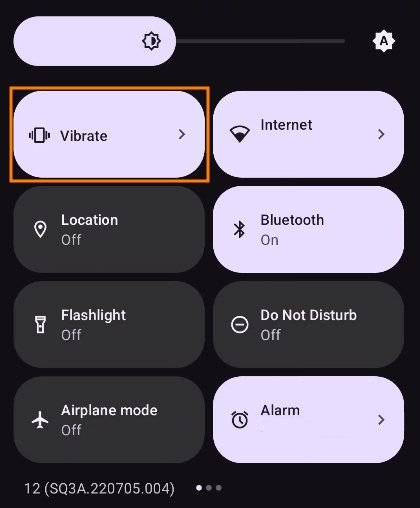
No button to toggle Silent/Sound/Vibration in Quick Settings? Restore!
At some point I noticed that the Quick Settings (near the top of the screen) lack a button to toggle the phone from silent, to vibration only, to speakers enabled. Turns out Sound Toggle solves that problem, that was a glad find.
No numbers row on top of the keyboard? Settings!
For the missing numbers row, GBoard fortunately has a setting to bring the numbers row back.
That's all I have for now, have a good time with Android.
Best, Sebastian
(German) Mamas Weihnachtsstolle
Zutaten
- 1.000 g Mehl
- 175 g Zucker
- 10 g Salz
- 0,5 l Milch
- 84 g Hefe (2 Würfel zu je 42 g)
- 250 g ungesalzene Butter
- 500 g Sultaninen
- 200 g Mandeln
- 30 g bittere Mandeln (Vorsicht: roh giftig!)
- 100 g Zitronat
- 35 ml brauner Rum
Besonderes Küchengerät
- Eine sehr große Schüssel (mindestens 3 l Fassungsvermögen)
Zubereitung
Phase 1: Rosinen-Bad
- Die Sultaninen/Rosinen und den Rum in eine flache Schale geben und gut verteilen, damit der Rum gleichmäßig von den Rosinen aufgenommen werden kann.
Phase 2: Rosinen-Schlaf (Warten 1)
- Die Rosinen etwa 10 Stunden ziehen lassen.
Phase 3: Mandel-Häutung
- Die Mandeln und bitteren Mandeln in ein Gefäß geben, mit kochendem Wasser bedecken, 10 Minuten warten.
- An ein bis zwei Mandeln testen, ob sich die Haut lösen lässt, sonst weiter ziehen lassen.
- Das Wasser abgießen und mit den Händen die nun leicht lösbare Schale von den Mandeln pellen.
- Die gepellten Mandel mit einem Mixer oder einem Messer grob zerkleinern.
Phase 4: Der Hefe-See
- Die sehr große Schüssel füllen mit Mehl, Zucker, Salz und mit den Händen gleichmäßig verteilen.
- Von der Milch die Hälfte — 0,25 l — auf dem Herd bis auf Handwärme erwärmen, nicht zum Kochen bringen. Ist die Milch zu heiß, wird sie die Hefe kaputtmachen.
- In der Mitte der Schüssel eine Kuhle formen, die für die Milch ausreichen kann, und dann die Milch hinein geben.
- Danach die Hefe mit den Händen zerbröckeln, in kleinen Menge in die handwarme Milch geben, und in der Milch vollständig auflösen.
- Vom Rand der Schüssel von der Mehl-Zucker-Salz-Basis solange nehmen und auf dem Hefe-See verteilen, bis dieser leicht aber vollständig bedeckt ist, damit die Hefe vor Zugluft und Kälte geschützt ist.
Phase 5: Hefe-Ausbruch (Warten 2)
- Etwa 20 bis 30 Minuten warten, bis der Hefe-See seine Decke etwas angehoben hat und größere Risse sichtbar werden.
Phase 6: Butter
- Die übrige Milch — 0,25 l — ebenfalls auf dem Herd erhitzen, aber nicht zum Kochen bringen, die Butter hinzugeben und schmelzen lassen.
- Das Milch-Butter-Gemisch in kleineren Menge in die Schüssel geben und die entstehende Masse mit beiden Händen kneten, bis keine Butter mehr übrig ist und eine konsistente Masse entsteht.
Phase 7: Bevölkerung
- Die Rum-Rosinen, Mandeln, bittere Mandeln und das Zitronat nach und nach vollständig in die Masse einarbeiten.
Phase 8: Gehen lassen (Warten 3)
- Mit einem Geschirrhandtuch bedeckt 2 Stunden lang an einem eher warmen Ort gehen lassen. Die Hefe muss vor Zugluft und Kälte geschützt bleiben, sonst fällt der Teig in sich zusammen.
Phase 9: Backen (Warten 4)
- Ofen vorheizen, bis er heiß ist; bei einem Herd ohne Thermometer circa 5 Minuten lang.
- Etwa 15 Minuten lang bei starker Hitze backen, zum Beispiel Stufe 6 von 8.
- Etwa 45 Minuten lang bei mittlerer Hitze backen, zum Beispiel Stufe 4 von 8.
- Die Stolle ist fertig gebacken, sobald sie vorsichtigem Druck von oben widerstehen kann.
Phase 10: Dekorieren
- Die fertig gebackene Stolle ohne Abkühlen in Maßen mit Puderzucker bestreuen.
- Fertig.
Expat 2.5.0 released, includes security fixes
libexpat is a fast streaming XML parser. Alongside libxml2, Expat is one of the most widely used software libre XML parsers written in C, precisely C99. It is cross-platform and licensed under the MIT license.
Expat 2.5.0
has been released
earlier today.
Most importantly, this release fixes
CVE-2022-43680:
a heap use-after-free vulnerability
after overeager destruction of a shared DTD
in function XML_ExternalEntityParserCreate
in out-of-memory situations,
with expected impact of denial of service
or potentially arbitrary code execution.
There are non-security bugfixes and other improvements, too.
For more details, please
check out the change log.
If you maintain Expat packaging or a bundled copy of Expat or a pinned version of Expat somewhere, please update to 2.5.0. Thank you!
Sebastian Pipping